1. Why reading is not enough 📚
There’s something nobody tells you when you start “studying crypto”: reading articles, watching videos and saving threads is not what changes your behaviour.
What really makes a difference is something much simpler:
Repeating good habits with a minimal structure until they become routine. 🔁
In the War Log we’ve already talked about topics such as:
- basic security for accounts and devices 🔐
- risk management for Hodlers ⚖️
- the difference between exchange and wallet 💼
- security routine and 24h plan 🚨
But as the articles came out, one thing became obvious:
Many people agree with the principles… and then don’t apply them, because there’s no simple tool to put them into practice.
That’s where the CryptoSlug project of practical tools comes in — small pieces that live in the browser and turn War Log articles into day-to-day panels. 🧰
2. The CryptoSlug model: Article → Concept → Tool 🛠️
The War Log is not a blog of opinions. Every article starts from real problems:
- “I don’t have a security routine, I keep postponing it.” ⏳
- “I don’t know how much I invest per month, I just see the balance move.” 📊
- “I have no idea what my total exposure is if the market drops 50%.” 📉
The internal process is always similar:
2.1. Identifying the real pain 🎯
First comes a concrete pain that you, me or anyone active in the market has felt. No floating theory: real-world problems.
2.2. Distilling the concept 🧪
The article grabs that pain, explains the context, highlights traps, shows simple examples and ends with:
“Okay, do it like this.”
The idea is that you can, with the article alone, put together a minimal plan that doesn’t depend on “how you feel” that day.
2.3. Designing an operational version 📋
That often starts as a rough draft:
- a calendar of checkpoints,
- a checklist you could copy into a notebook,
- a small spreadsheet model (like the basic Hodler Diary).
2.4. Turning it into a CryptoSlug tool ⚙️
Once we see that the scheme genuinely helps, we take the next step:
- we build a tool in HTML/JS, 100% in the browser,
- no login, no cloud, no data scattered around,
- focused on making the steps repeatable and easy to follow.
The goal is not to have “magic apps”. It’s to have simple tools that reinforce the habits the articles teach.
- Article → gives you clarity and context.
- Tool → forces you to execute and repeat.
- You → gain discipline without relying on random motivation.
And this is not only the site evolving. It’s a shared path:
- the site gains new sections and tools,
- the reader climbs ranks (Spawnling → Shellborn → …),
- the tools themselves get deeper as the foundation solidifies.
3. Real example: from Security Routine to SlugSentinel V1 🛡️
One of the most critical topics at the beginning is security. Before talking about bots, APR or SCAA, the War Log focused on:
- how to set up a decent initial security setup (dedicated email, 2FA, passwords, devices, APIs),
- how to define a short weekly / bi-weekly routine so you’re not “an easy target”,
- how to perform a deeper monthly review,
- what to do in the first 24h if something goes wrong (24h plan).
The problem is simple and brutal:
Without a visible calendar and a panel telling you “you’re on track” or “you’re slipping”, the routine dies after two weeks.
That’s where the first Article → Tool example appears:
SlugSentinel V1 — Spawnling · Basic Hodler
We took the Security Routine logic and:
- mapped each step as a concrete task 🔎
- defined a way to measure whether it’s on time or late 🟢🟡🔴
- condensed everything into a single, visual, easy-to-read panel 📟
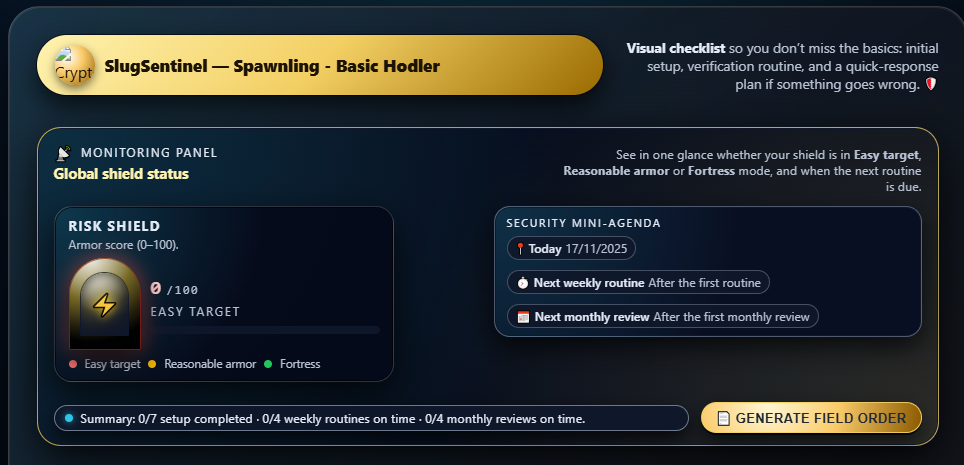
The result is a small “cockpit” in the browser that tells you, without sugar-coating, if your security armour is:
- in Fortress mode 🟢
- in “so-so” mode 🟡
- or in Easy Target mode 🔴
4. What is SlugSentinel V1? 🎯
SlugSentinel V1 is the first official tool of this line:
You can open the tool directly at SlugSentinel V1 and, if you want the full step-by-step, there is a dedicated guide at SlugSentinel & Security Routine — full guide.
- it lives in your browser,
- it doesn’t need a login or account 👤,
- it stores state in localStorage (on your device),
- and it mirrors the security calendar defined in the War Log.
Instead of being just another “fancy dashboard”, it’s a panel built for Spawnling / Basic Hodler, focused on three things:
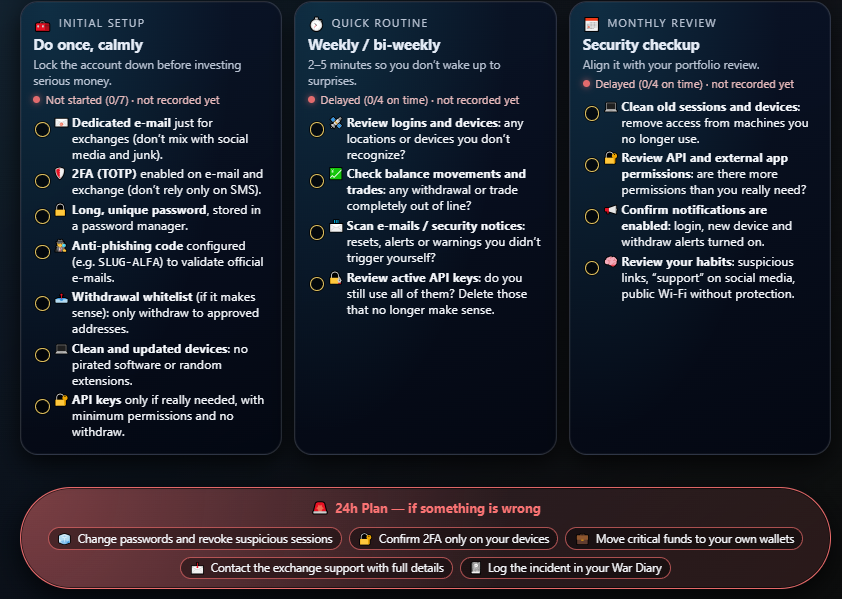
4.1. Initial setup 🔐
Making sure you close the obvious doors:
- dedicated email,
- properly configured 2FA,
- decent, unique passwords,
- whitelist and clean devices,
- APIs only when they make sense and with minimal permissions.
4.2. Weekly / bi-weekly routine ⏱️
Avoid waking up to surprises due to lack of attention:
- review logins and devices,
- review movements and withdrawals,
- review security emails,
- review active APIs.
4.3. Monthly review + 24h plan 📅
Building the habit of a deeper checkup and having a clear plan for the first 24h if something feels wrong:
- a more “surgical” monthly review,
- a red block with what to do if things go bad (the 24h plan),
- and a Field Order text ready to paste in the War Log. 📓
5. How to use SlugSentinel in practice (short version) 🧭
This is not the full manual (that lives in its own guide). But a quick mental map helps:
5.1. Open it and handle the Initial Setup 🧰
- Open SlugSentinel V1 always in the same browser/device.
- Go line by line through the initial setup card.
- As you complete each item, tick it off. ✅
- You can split the setup into 2–3 short sessions; it doesn’t all need to be done in one day.
5.2. Schedule the Quick Routine 🔄
- Pick a fixed day of the week (or every 15 days).
- On that day, open SlugSentinel, run through the quick routine and tick off what you checked.
- Check if the LEDs and the “Risk Shield” are green, or if there are yellow/red items to fix.
5.3. Monthly Review + Field Order 📝
- On the day you review your portfolio and PnL, open the tool as well.
- Go through the monthly review card and mark the tasks you completed.
- Generating a Field Order and pasting it into the War Log becomes routine — you build a real history of your reviews.
5.4. If something feels wrong, use the 24h Plan 🚨
- If something smells off, follow the red 24h plan block (don’t improvise).
- Lock down accounts and funds, log the incident, and only then go back to optimising the rest.
- Tools help with discipline, but they don’t replace common sense.
- SlugSentinel won’t protect you from clicking shady links or talking to fake “support” on Telegram.
6. Evolving together: site, reader and tools 🚀
SlugSentinel V1 is just the first step of a clear line:
- War Log articles explain concepts and provide structure.
- CryptoSlug tools are born from those articles, to make that structure usable.
- You, by using them, give implicit feedback: where you fail, what’s hard, which points need reinforcement.
Over time, the plan is:
- for early ranks (Spawnling / Basic Hodler): tools like SlugSentinel, a simple Hodler Diary, basic DCA and exposure simulators;
- for later ranks: tools that talk to real data (SCAA, dashboards, more advanced SlugSim), always built on top of these first blocks.
The goal was never to have a site full of shiny buttons. 🎛️ The goal is to have a training ground where:
- each article brings you clarity,
- each tool gives you a way to repeat that clarity,
- and both evolve with you — not ahead of you, not lagging behind.
Recommended next step 🧱
If you still don’t have any security routine, the natural order is:
- Read the Security Routine article in the War Log.
- Write down your first basic plan.
- Open SlugSentinel V1 and turn that plan into a real routine.
The rest — bots, automation, SCAA, dashboards — comes later. First, you armour the base. Then, accelerating stops being suicide and becomes strategy. 🪖